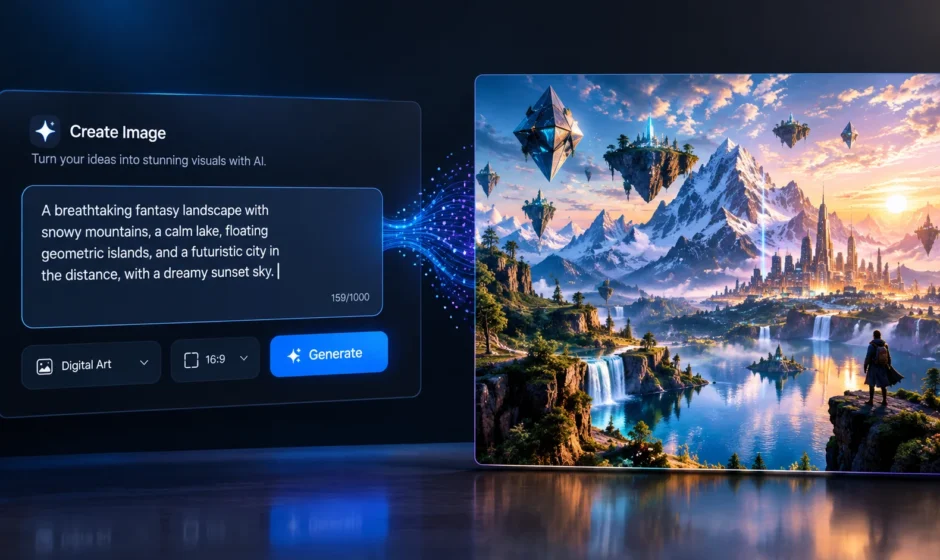

OpenDream is a free, browser-based AI art generator that turns written text prompts into digital images. Users type a description, pick a model, and receive an original image within seconds. The platform launched around 2023 and runs on Stable Diffusion, an open-source image generation technology that also powers several other AI art tools on the market. No downloads, coding, or design software are required.
How OpenDream AI Works?
OpenDream follows a simple, repeatable workflow. A user describes the image they want in plain language, similar to how they’d describe it to another person. The platform then selects an AI model based on the user’s choice, applies that model to the written prompt, and generates one or more images that attempt to match the description. Users can adjust settings like style, composition, and level of detail before generating, then download, regenerate, or refine the result afterward.
Everything runs directly in a web browser. According to OpenDream’s own site, it works across standard browsers including Chrome and Safari, without requiring a powerful local computer or graphics card.
What Models Does OpenDream Offer?
According to OpenDream’s official site, the platform includes at least two core models. Dreamlike Photoreal 2.0 generates photorealistic images, designed to resemble real photographs. Dreamlike Anime 1.0 generates anime-style artwork.
Some third-party reviews describe OpenDream as offering up to four total models, with free users getting access to two and paid subscribers unlocking the remaining two. This detail isn’t fully confirmed on OpenDream’s own current site, so treat the exact model count as something that may have changed or expanded since some of these reviews were published.
How OpenDream AI Art Generation Actually Works?
Text-to-image AI tools like OpenDream rely on a technology category called diffusion models. Understanding the basic mechanism helps explain both what these tools can do well, and where their limits show up. A diffusion model is trained on a large dataset of images paired with text descriptions. During training, the model learns statistical relationships between words and visual patterns, textures, shapes, and compositions.
When a user submits a prompt, the model starts with a field of random visual noise. It then gradually refines that noise, step by step, adjusting it to more closely match the patterns associated with the submitted text. After enough refinement steps, the result becomes a coherent image. This is fundamentally different from how a human artist creates an image. The AI model isn’t retrieving or copying an existing picture. It’s generating a new arrangement of visual patterns based on statistical associations learned from its training data.
What Makes a Prompt Effective?
Prompt specificity strongly influences how closely a generated image matches what a user actually envisioned. General, model-agnostic best practices, confirmed across multiple platforms in this category, tend to apply to OpenDream as well.
Clear subject descriptions help the model understand what the main focus of the image should be. Style references, like “photorealistic,” “watercolor,” or “anime,” guide which visual patterns the model leans on. Composition details, such as camera angle or lighting, further narrow the range of possible outputs.
Vague prompts tend to produce more generic or unpredictable results, since the model has less specific guidance to work from.
OpenDream’s Pricing and Access
OpenDream offers a free tier, though sources describe it differently in terms of exact daily credit allowances. Some sources describe the free plan as including a set number of daily credits, while OpenDream’s own site describes a forever-free plan with more limited settings and lower generation priority. Given this discrepancy across sources, readers should confirm current free-tier limits directly on OpenDream’s site before relying on a specific number.
Paid plans have been reported starting at approximately $12 per month for a set credit allowance, unlocking additional models and faster generation. As with any subscription-based tool, exact pricing and credit amounts can change, so current details should be confirmed directly through the platform rather than relied on from older third-party reviews.
Who Owns AI-Generated Art From OpenDream?
According to OpenDream’s own site, users generally retain ownership of the artwork they create on the platform. The company states that images can be used for commercial purposes, provided users comply with its platform policies.
This ownership structure is fairly common among consumer AI art platforms, though specific terms can vary by company. Anyone planning to use AI-generated art commercially should review a platform’s current terms of service directly, since policies in this space have continued to evolve as the technology matures.
How OpenDream AI Compares to Other AI Art Tools?
OpenDream is generally positioned as an accessible, beginner-friendly entry point into AI art generation, rather than a professional-grade tool aimed at advanced users.
Reviews commonly describe it as easier to use than more advanced competitors like Midjourney, which typically involves a steeper learning curve and more granular creative control. In exchange for that simplicity, OpenDream reportedly offers less fine-tuned control over generation results compared to some premium alternatives.
This trade-off, simplicity versus control, is a common pattern across the AI art generator market. Tools aimed at fast, accessible results tend to prioritize ease of use, while tools aimed at professional creative workflows tend to prioritize precision and customization.
Common Use Cases for OpenDream
Based on how the platform describes itself and how reviewers have used it, several common use cases stand out.
Marketing and social media visuals represent a frequent use case, given the platform’s speed and commercial-use permissions. Concept art and creative brainstorming benefit from OpenDream’s fast iteration speed, letting users quickly visualize different ideas.
Personal creative projects, including anime-style artwork, logos, and character designs, are also commonly cited use cases, aligning with the platform’s template library and specialized generation options.
Limitations Worth Understanding
AI art generation tools, including OpenDream, share certain limitations tied to how diffusion models work in general.
Highly specific or technically complex requests, such as accurate text within an image or precise anatomical detail, can be inconsistent across most current text-to-image tools, not just OpenDream specifically. Results can also vary between generations, even using the same prompt, since the underlying process involves an element of randomness during image refinement.
Understanding these limitations helps set realistic expectations, rather than assuming any AI art tool will produce a fully predictable, exact result on the first attempt.
Frequently Asked Questions
What is OpenDream AI art?
OpenDream is a free, browser-based platform that converts written text prompts into AI-generated digital artwork, built on Stable Diffusion technology.
Is OpenDream free to use?
OpenDream offers a free tier, though exact daily credit allowances are described differently across sources. Paid plans are also available for additional models and faster generation.
Can I use OpenDream images commercially?
According to OpenDream’s own site, users generally retain ownership of their generated artwork and can use it commercially, provided they follow the platform’s usage policies.
How is OpenDream different from Midjourney?
OpenDream is generally considered more beginner-friendly and simpler to use, while Midjourney is often described as offering more advanced creative control, aimed at more experienced users.
Does OpenDream require design software or coding skills?
No. OpenDream runs entirely in a standard web browser and requires no downloads, installations, or coding knowledge to use.