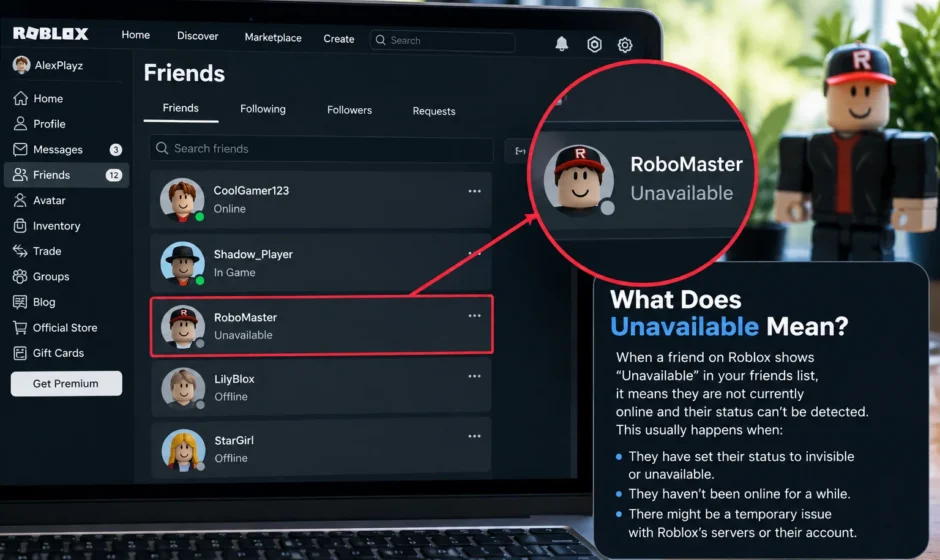

On Roblox, Unavailable next to a friend’s name usually means their profile or account currently can’t be shown to you. Most often because of Roblox’s age verification and chat restrictions, a privacy setting, a regional law like the UK’s Online Safety Act, or a temporary display bug. It does not automatically mean you’ve been blocked, banned, or that the person deleted their account, though those are also possible in rarer cases.
If you’ve opened your Roblox friends list recently and noticed one or more names showing Unavailable instead of the person’s actual username, you’re not alone — and you’re definitely not imagining an increase. This label has become far more common throughout 2025 and 2026 because of major changes to how Roblox handles age verification, chat, and cross-age communication. Below is a complete breakdown of every real reason this happens, how to tell which one applies to you, and what — if anything — you can do about it.
The Main Reasons a Roblox Friend Shows as Unavailable
There isn’t just one cause. Roblox uses Unavailable as a catch-all label for several different underlying situations, and the platform doesn’t always tell you which one applies. Here’s what’s actually going on behind each version.
1. Age Verification and Cross-Age Chat Restrictions (Most Common in 2026)
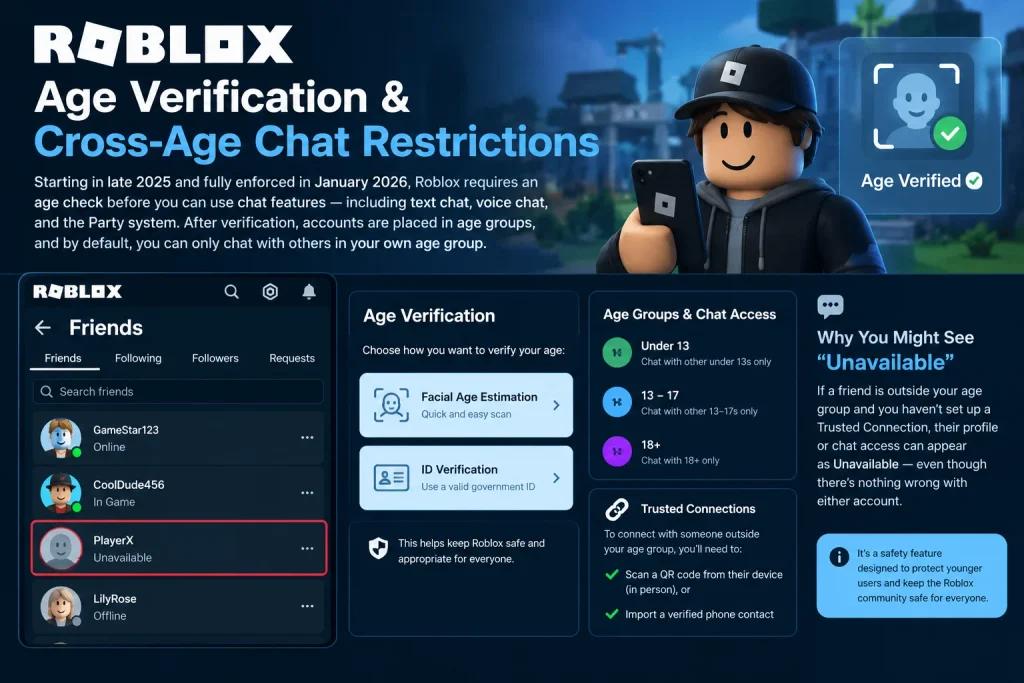
Starting in late 2025 and reaching full global enforcement in January 2026, Roblox began requiring an age check — either a facial age estimation scan or ID verification — before anyone can use chat features on the platform. This includes in-experience text chat, voice chat, and the Party system.
Once age-checked, accounts are sorted into age groups, and by default, users can only chat and connect socially with others in their own age group. If a friend falls outside your assigned age group and you haven’t set up a Trusted Connection (previously called “Trusted Friends,” and before that “Trusted Connections” again — the naming has shifted a few times in 2026), their profile or chat access can appear restricted or show as Unavailable from your account’s perspective.
Trusted Connections require proof of a real-world relationship — typically scanning a QR code from the other person’s device in person, or importing a verified phone contact. Without that step, cross-age-group friends can look unavailable even though nothing is technically wrong with either account.
2. Regional Privacy Laws (Especially the UK Online Safety Act)
Since 2023, Roblox accounts registered in the United Kingdom have had their public friends lists hidden as part of complying with the UK’s Online Safety Act. That restriction is still in effect in 2026 and was extended rather than rolled back. If you or a friend has a UK-based account, this alone can cause Unavailable labels to appear where a friends list would normally be visible.
Other countries have introduced similar child-protection digital regulations recently — for example, Indonesia’s Government Regulation Number 17 of 2025 requires platforms like Roblox to restrict account visibility for younger users. As more regions pass similar laws, expect this specific cause to become more common, not less.
3. Privacy Settings on the Other Person’s Account
Sometimes Unavailable has nothing to do with age checks or regional law at all — it simply means the other player has adjusted their own privacy settings. Roblox lets users control:
- Who can view their full profile
- Who can send them friend requests
- Who can join their in-game sessions (“Who can join me?”)
If a friend has tightened any of these settings, certain parts of their profile — including how they appear on your friends list — can show as unavailable to you specifically, even though their account is completely normal and active.
4. Account Deactivation, Termination, or Deletion
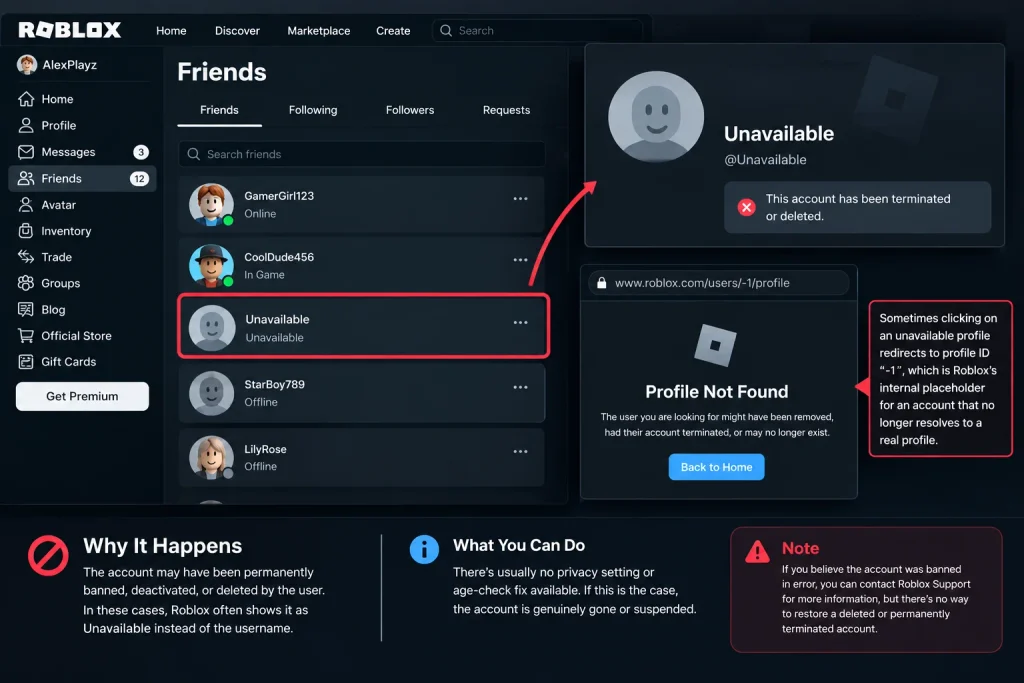
This is the possibility most people worry about first, but it’s actually one of the less common causes. If an account has been permanently banned, deactivated, or deleted, Roblox may display it as Unavailable rather than showing the username at all. A related technical symptom reported on Roblox’s own Developer Forum: clicking one of these unavailable profiles sometimes redirects to profile ID “-1,” which is Roblox’s internal placeholder for an account that no longer resolves to a real profile.
If this is the cause, there’s typically no privacy setting or age-check fix available — the account is genuinely gone or suspended.
5. Display Bugs and Glitches
Roblox’s own developers have publicly acknowledged multiple bugs tied to the Unavailable label throughout 2025 and 2026, including:
- Profiles incorrectly showing as unavailable when switching between friend-list tabs, sometimes duplicating the same Unavailable entry multiple times
- An “infinite unavailable account” bug where scrolling through a friends list keeps generating new unavailable placeholder entries
- Friend requests showing senders as Unavailable instead of their actual username
These are confirmed, reported issues rather than user error, and Roblox has acknowledged some are related to the broader rollout of age-verification and regional compliance systems layered on top of the friends system.
Quick Reference: Which Cause Applies to You?
| What You’re Seeing | Most Likely Cause |
| Happens with several friends at once, started recently | Age verification / cross-age chat restriction |
| Friend is based in or connected to the UK | UK Online Safety Act friend-list restriction |
| Only one specific friend, others look normal | That friend’s personal privacy settings |
| Clicking the profile leads to a broken or “-1” page | Account banned, deactivated, or deleted |
| Appears, disappears, or duplicates when you refresh or switch tabs | A known display bug |
Does Unavailable Mean You’ve Been Blocked?
Not necessarily, and in most 2026 cases, it doesn’t. Being blocked on Roblox typically removes the person from your friends list entirely or prevents you from finding their profile through search — it doesn’t usually leave a visible Unavailable placeholder in their normal spot on your list. If a friend still appears on your list at all, even labeled “Unavailable,” that’s ctually a sign the friendship connection itself is still intact; something about displaying their current information is what’s restricted.
“Friends” Is Now Called “Connections” — Does That Matter Here?
Yes, and it’s worth knowing if you’ve seen the term “Connections” and wondered whether it’s related. In 2026, Roblox renamed “Friends” to “Connections” platform-wide as part of its broader social-features overhaul, alongside raising the friend cap from 200 to 1,000. The underlying system works the same way — this is a naming change, not a new feature — but it means some help articles, forum posts, and in-app screens may refer to “unavailable Connections” rather than “unavailable friends.” They’re describing the same thing.
How to Fix an Unavailable Friend, If Possible
What you can actually do depends entirely on the cause:
- If it’s age verification related: Complete Roblox’s age check if you haven’t already, and set up a Trusted Connection with the specific friend using the QR-code or contact-import method, if you have a genuine real-life relationship with them.
- If it’s a privacy setting: There’s nothing to fix on your end — it’s the other person’s choice, and respecting it is the only real option.
- If it’s a regional law issue (like the UK OSA): This isn’t something either user can override; it’s a legal requirement Roblox has to follow.
- If the account was banned or deleted: Unfortunately, this typically can’t be reversed from your side.
- If it looks like a bug: Try refreshing the page, logging out and back in, or checking Roblox’s official Developer Forum bug-report threads to see if it’s a known, already-reported issue rather than something specific to your account.
The Bigger Picture: Why This Got So Much More Common in 2026
If this feels like a newer problem, that’s because it genuinely is. Roblox’s mandatory age-check rollout — which reached full global enforcement in January 2026 — was one of the largest platform-wide changes in the company’s 20-year history, and it came with real friction: Roblox itself reported daily active users dropping from roughly 152 million in Q3 2025 to about 132 million in Q1 2026, with company leadership publicly acknowledging the age-check rollout created “greater than expected” resistance from users. The Unavailable label spike that many players noticed lines up directly with this timeline, not with anything a specific user did wrong.
The Bottom Line
Unavailable on a Roblox friends list is almost always a side effect of Roblox’s 2025-2026 safety and age-verification overhaul, a regional privacy law, or a personal privacy setting — not a sign that something has gone wrong with your account specifically. The main exception is when a profile leads to a broken or “-1” page, which usually does mean the account is gone. For everything else, it’s worth checking whether you’ve completed Roblox’s age check and whether a Trusted Connection needs to be set up before assuming anything more serious is going on.
FAQs
Does Unavailable on Roblox mean someone blocked me?
Not usually. Being blocked typically removes a person from your list or search results entirely, rather than leaving a visible Unavailable placeholder. If they still show up on your list, the friendship connection is likely still intact.
Why are so many of my friends showing as Unavailable all of a sudden in 2026?
This is most likely tied to Roblox’s mandatory age-verification rollout, which reached full global enforcement in January 2026. Friends outside your verified age group can appear unavailable unless you’ve set up a Trusted Connection with them.
What is a Trusted Connection on Roblox?
It’s Roblox’s system for allowing verified cross-age-group communication between people who know each other in real life. It requires scanning a QR code from the other person’s device in person or importing a verified phone contact.
Is “Connections” the same thing as “Friends” on Roblox?
Yes. Roblox renamed “Friends” to “Connections” as part of its 2026 platform update. It’s the same underlying friend system with a new name, alongside a higher friend cap (raised from 200 to 1,000).
Can a Roblox account really be Unavailable due to a bug and not an actual problem?
Yes. Roblox’s own Developer Forum has multiple confirmed reports of Unavailable display bugs in 2025-2026, including duplicate entries and an “infinite unavailable account” glitch, unrelated to any actual issue with the accounts involved.
How do I know if a friend’s account was actually banned or deleted, versus just showing as unavailable?
If clicking their profile leads to a broken page or redirects to a placeholder profile (sometimes labeled internally as ID “-1”), that generally indicates the account has been banned, deactivated, or deleted, rather than a restriction or bug.