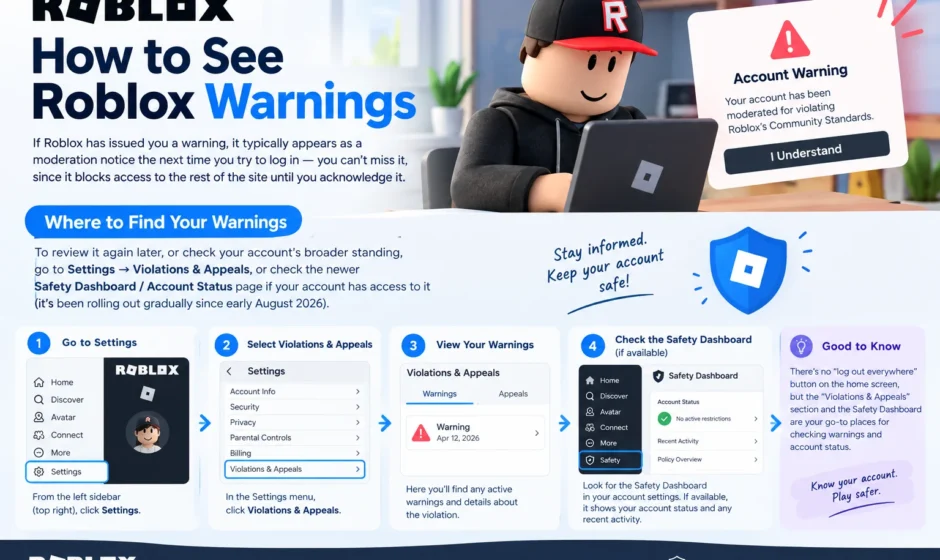

If Roblox has issued you a warning, it typically appears as a moderation notice the next time you try to log in — you can’t miss it, since it blocks access to the rest of the site until you acknowledge it. To review it again later, or to check your account’s broader standing, go to Settings → Violations & Appeals, or check the newer Safety Dashboard / Account Status page if your account has access to it (it’s been rolling out gradually since early August 2026).
Here’s how each system works, what a warning notice actually tells you, and what to do next.
What a Roblox Warning Actually Is
Roblox uses a graduated moderation system rather than jumping straight to a ban for every violation. The typical escalation path looks like:
Warning → Timeout / short suspension (1, 3, 7, or 14 days) → Longer suspension (up to 6 months or a year) → Permanent termination
A warning is the lightest level — something you can typically resolve immediately just by acknowledging it, without losing access to your account. It exists specifically to flag a Community Standards violation before it escalates further, rather than being a real punishment in itself.
Where Warnings First Appear
If your account has an active warning, ban, or termination, Roblox intercepts your login and shows a moderation notice before you reach the home page — you’ll see it whether you’re on the website, the app, or a console. This notice typically includes:
- The violation category (common ones include harassment, scamming, exploiting, or inappropriate content)
- A short moderator note describing the general behavior involved — not exact evidence, but enough to identify what triggered it
- The duration of any suspension, if applicable
It’s worth taking a screenshot of this notice before dismissing it. The exact wording matters if you plan to appeal, and the notice isn’t always easy to pull back up in full later.
Reviewing Past Warnings: Violations & Appeals
For a record of past moderation actions rather than just the one currently blocking your login, Roblox’s existing system is called Violations & Appeals, found under Settings → Help & Safety → Violations & Appeals. This portal shows moderation history and lets you submit an appeal directly if you believe an action was issued incorrectly.
The Newer Safety Dashboard (Account Status)
In August 2026, Roblox began rolling out a new Safety Dashboard, also referred to as the Account Status page, which goes further than the older Violations & Appeals portal. Rather than only showing information after you’ve already been notified of a violation, it gives a more complete, self-service view of your account’s overall moderation standing in one place.
If your account has access to it, the dashboard typically shows:
- An Account Standing indicator — a general meter suggesting how close your account is to a ban (Roblox does not show a precise percentage or countdown; it’s a general indicator, not an exact prediction)
- A list of recent moderation actions, including warnings, timeouts, or suspensions
- Context on how repeated or more severe violations escalate penalties over time
It’s worth knowing this is genuinely still an early-stage rollout as of this writing. Multiple reports from Roblox’s Developer Forum note that access is inconsistent between accounts and doesn’t appear tied to whether an account has a clean record — some accounts with zero violations already have it, while others with an actual moderation history still only see the older portal. If you check and don’t see the new dashboard, that’s expected behavior during a staged rollout, not a sign something’s wrong with your account specifically.
How to Access It?
- Go to Settings on the Roblox website or app.
- Look for Safety Dashboard or Account Status if your account has it, or Violations & Appeals if it doesn’t yet.
- Review any listed Account Standing section along with recent moderation activity.
- If the page isn’t available or redirects you elsewhere, your account likely hasn’t been given access to the new feature yet — use the existing Violations & Appeals system instead.
Avoid third-party “Roblox ban checker” websites that ask for your login credentials or session cookie to show your status. Your moderation standing is private account information, and there’s no legitimate reason a third-party site needs your password or authentication cookie to display it.
Understanding an In-Experience Ban vs. an Account-Wide Warning
It’s worth distinguishing two different things that can look similar at first glance. If you were removed from a specific game and see Error Code 267, that restriction lives entirely inside that one experience — it’s issued by the game’s own creator or moderation tools, not by Roblox itself, and doesn’t affect your platform account, Robux, inventory, or any other game. Roblox Support generally can’t lift experience-level bans like this, since they aren’t part of Roblox’s own account moderation system. An actual account-wide warning, by contrast, is issued by Roblox directly and shows up through the moderation notice or Safety Dashboard described above.
How to Appeal a Warning?
Most moderation actions other than a permanent termination can be appealed:
- Open the moderation notice itself, or go to Violations & Appeals under Settings.
- If an Appeal button appears directly on the listed action, use it.
- If the action isn’t listed there, use the Support Form instead: Help & Safety → Violations & Appeals → Support, then select Appeal a Decision as the category.
- You have 30 days from the date of the moderation action to submit an appeal.
Appeal response times vary considerably depending on current support volume — anywhere from about 12 hours during low-traffic periods to up to 7 days when the queue is heavier.
A Note on Regional Notification Requirements
Since February 2024, Roblox has provided more detailed moderation notifications for EU-based users specifically, as part of complying with the EU’s Digital Services Act (DSA). This includes information about the decision, users’ DSA rights, and whether an automated process was involved in the moderation action, with the EU Commission also receiving this information for transparency purposes. If you’re in the EU, your moderation notices may include more detail by law than what’s shown to users elsewhere.
The Bottom Line
Roblox warnings are hard to miss when they happen — they block your login until acknowledged — but reviewing the full details afterward, or proactively checking your broader account standing, means using either the established Violations & Appeals portal or, if your account has been granted access, the newer Safety Dashboard rolling out since August 2026. Screenshotting any notice as soon as you see it, understanding the difference between an in-experience ban and an account-wide warning, and appealing within the 30-day window if you believe an action was wrong are the most practical steps to actually act on this information.
For related account questions, our guide to How to Sign Out of All Devices on Roblox which covers a similar Settings-menu security topic, and if you’ve also noticed friends showing unusual statuses on your list, here’s what Unavailable means on Roblox friend list. A separate issue tied to Roblox’s broader 2026 age-verification rollout rather than moderation.
FAQs
Where do I see a Roblox warning after I’ve already dismissed the login notice?
Check Settings → Violations & Appeals for a record of past moderation actions, or the newer Safety Dashboard / Account Status page if your account has access to it.
What is Roblox’s Safety Dashboard?
It’s a newer, more complete account moderation view that began rolling out in August 2026, showing an overall Account Standing indicator alongside recent moderation actions, going further than the older Violations & Appeals portal.
Does Roblox show an exact percentage of how close I am to being banned?
No. The Account Standing meter is a general indicator, not a precise prediction — Roblox does not publish an exact score or countdown toward a ban.
Is a game-specific ban (Error Code 267) the same as a Roblox account warning?
No. Error Code 267 is an in-experience restriction issued by that specific game’s own creator or moderation tools, and it doesn’t affect your platform account, Robux, or access to other games. An account-wide warning is issued directly by Roblox.
How long do I have to appeal a Roblox warning or ban?
30 days from the date of the moderation action. Most actions besides a permanent termination can be appealed through Violations & Appeals or the Support Form.
Should I use a third-party website to check my Roblox ban status?
o. Avoid third-party “ban checker” sites that ask for your Roblox password or session cookie — your moderation standing is private account information, and there’s no legitimate reason an external site needs your login credentials to show it.