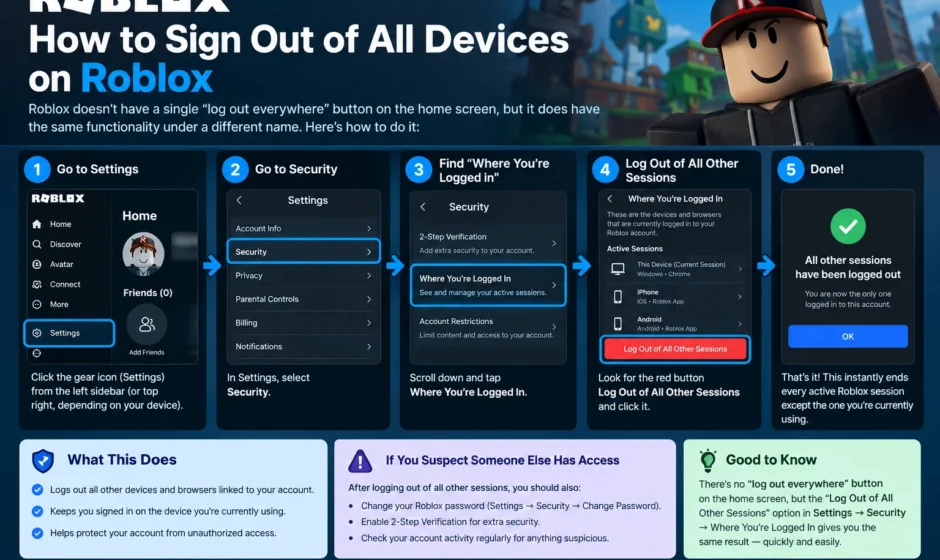

Roblox doesn’t have a single “log out everywhere” button on the home screen, but it does have the same functionality under a different name. Go to Settings → Security → Where You’re Logged In, then select Log Out of All Other Sessions. This instantly ends every active Roblox session except the one you’re currently using — no need to track down and log out of each device individually.
This instantly ends every active Roblox session except the one you’re currently using no need to track down and log out of each device individually. Here’s the full walkthrough, what this actually does to your account, and what to do next if you’re doing this because you suspect someone else has access.
Step-by-Step: Signing Out of All Devices on the Website
- Go to roblox.com in a browser and sign in.
- Click the gear icon in the upper-right corner to open Settings.
- Select the Security tab from the left-hand menu.
- Scroll down to the section labeled “Where You’re Logged In.”
- Click “Log Out of All Other Sessions.”
- Confirm the action if prompted.
This immediately invalidates the session tokens for every device except your current one. If someone else was actively logged in and playing a game on your account, they’re disconnected right away and sent back to the login screen.
Step-by-Step: Doing This From the Mobile App
- Open the Roblox app and tap the three dots (More) icon in the bottom right.
- Tap Settings.
- Select Security.
- Scroll to “Where You’re Logged In” and tap the logout option there.
The steps are functionally identical to the browser version — Roblox just places the menu one tap deeper inside the mobile app’s navigation.
What About Consoles and VR Headsets?
Consoles and headsets don’t have their own separate “log out everywhere” control — they rely on the same account-level session list:
- Xbox: Signing out locally is done through the console’s own settings menu, but to remotely end an Xbox session tied to your Roblox account, use the same “Where You’re Logged In” list from a browser or the mobile app.
- PlayStation: Disconnecting removes the link between your Roblox account and PlayStation account entirely, which is a more permanent step than a simple session logout.
- Meta Quest (2, Pro, and 3): Roblox doesn’t provide a separate logout sequence inside the headset. To remove a Quest session, go to Settings → Security → Where You’re Logged In, find the Quest session in the list, and select Log out of session. Note that the original Meta Quest 1 isn’t supported by Roblox at all.
In every case, the browser or app-based Security settings page is the actual control center — individual devices don’t manage their own remote sign-out.
Understanding Roblox’s Account Session Protection
Roblox has also introduced a security feature called Account Session Protection, aimed specifically at preventing “session hijacking” (sometimes called “cookie logging”), where someone steals your login session token and tries to reuse it on a different device or network. This feature validates that your session matches your actual hardware and network environment, and it’s enabled by default for all accounts. If someone steals a session cookie and tries to use it elsewhere, Roblox’s system is designed to detect the mismatch and block the access automatically — a layer of protection that works quietly in the background, separate from manually signing out of sessions yourself.
What Signing Out of All Devices Does NOT Do
It’s worth being clear about the limits of this action, since it’s easy to assume it does more than it actually does. Logging out of all devices does not:
- Delete your Roblox account
- Remove your Robux balance
- Cancel a Premium subscription
- Erase your friends/Connections list
- Reset your avatar or in-game progress
The only real change is that all existing sign-in sessions are closed. Anyone trying to access the account afterward — including you, on your other devices — has to sign back in with your username, email, or phone number, plus your password. If you have two-step verification enabled, a verification code is required too.
Important: This Is a First Step, Not a Full Fix
If you’re signing out of all devices because you suspect unauthorized access — not just because you used a shared computer — treat this as the first step, not the final one. If someone else knows your password, they can simply sign back in after being logged out, unless you also:
- Change your password immediately, ideally to something you haven’t used on any other site.
- Enable two-step verification if it isn’t already on, adding a second layer beyond just the password.
- Check your linked email account’s security too, since a compromised email can be used to reset your Roblox password regardless of how strong it is.
Changing your password on its own also has a useful side effect: Roblox automatically signs out every device that was using the old password, which functions as an alternative way to force a sign-out everywhere, even without visiting the Security settings page directly.
If the Logout Option Doesn’t Work
Occasionally the “Where You’re Logged In” list or the logout button doesn’t respond right away — this is usually caused by an app bug or a temporary session error rather than anything wrong with your account. If this happens:
- Refresh the page or restart the app.
- Try a different browser or device to access the Security settings.
- If problems persist, changing your password (which forces a sign-out on every device using the old one) is a reliable fallback that doesn’t depend on the session-list feature working correctly.
How This Connects to Other Roblox Account Quirks
Account and session management on Roblox has gotten more complex recently, partly due to the platform’s broader security and age-verification overhaul. If you’ve also noticed friends or profiles showing strange statuses, it’s worth reading what does Unavailable means on Roblox friends list. A related but separate issue tied to Roblox’s 2026 privacy and age-verification systems rather than account sessions specifically. And if you’re building or scripting rather than just managing account security, we have covered how to Undo and Redo in Roblox Studio. This covers a completely different but equally common source of Roblox confusion.
The Bottom Line
Signing out of all Roblox devices at once is a simple, one-screen action — Settings → Security → Where You’re Logged In → Log Out of All Other Sessions. And it works the same way across browser, mobile app, consoles, and VR headsets, since they all pull from the same session list. It’s a genuinely useful first response to a lost device or a shared computer, but if you suspect actual unauthorized access, pair it with a password change and two-step verification rather than treating the logout alone as a complete fix.
FAQs
Does Roblox have a single “log out of everywhere” button?
Not labeled exactly that way, but the same function exists under Settings → Security → “Where You’re Logged In” → “Log Out of All Other Sessions.”
Will signing out of all devices delete my Roblox account or Robux?
No. It only ends active login sessions. Your account, Robux balance, Premium subscription, friends list, and game progress remain completely unaffected.
How do I remotely log out a Roblox session on Xbox or Meta Quest?
Consoles and headsets don’t have their own remote logout controls — use the “Where You’re Logged In” session list from a browser or the mobile app, find the specific device, and select “Log out of session.”
Does changing my Roblox password log out other devices automatically?
es. Roblox signs out every device that was using the old password once you change it, which works as an alternative way to force a sign-out everywhere.
What should I do if I think someone else is logged into my Roblox account?
Sign out of all sessions immediately, then change your password, enable two-step verification if it isn’t already active, and check the security of your linked email account, since a logout alone won’t stop someone who still knows your password.
What is Roblox’s Account Session Protection feature?
It’s a background security feature that checks whether your login session matches your actual device and network. If a stolen session token is used from a different, mismatched environment, Roblox’s system is designed to detect and block that access automatically.